Artists are always looking for the most inexpensive yet graphics drawing tablets that maximize their creativity and minimize inefficiency. Below, we've summed up our top choices for the most affordable digital tablets with all the perks you'll come to love in a mobile art studio.
Wacom Intuos Art Medium Pen and Touch – Best buy Graphics drawing Tablets with Graphics Software Included
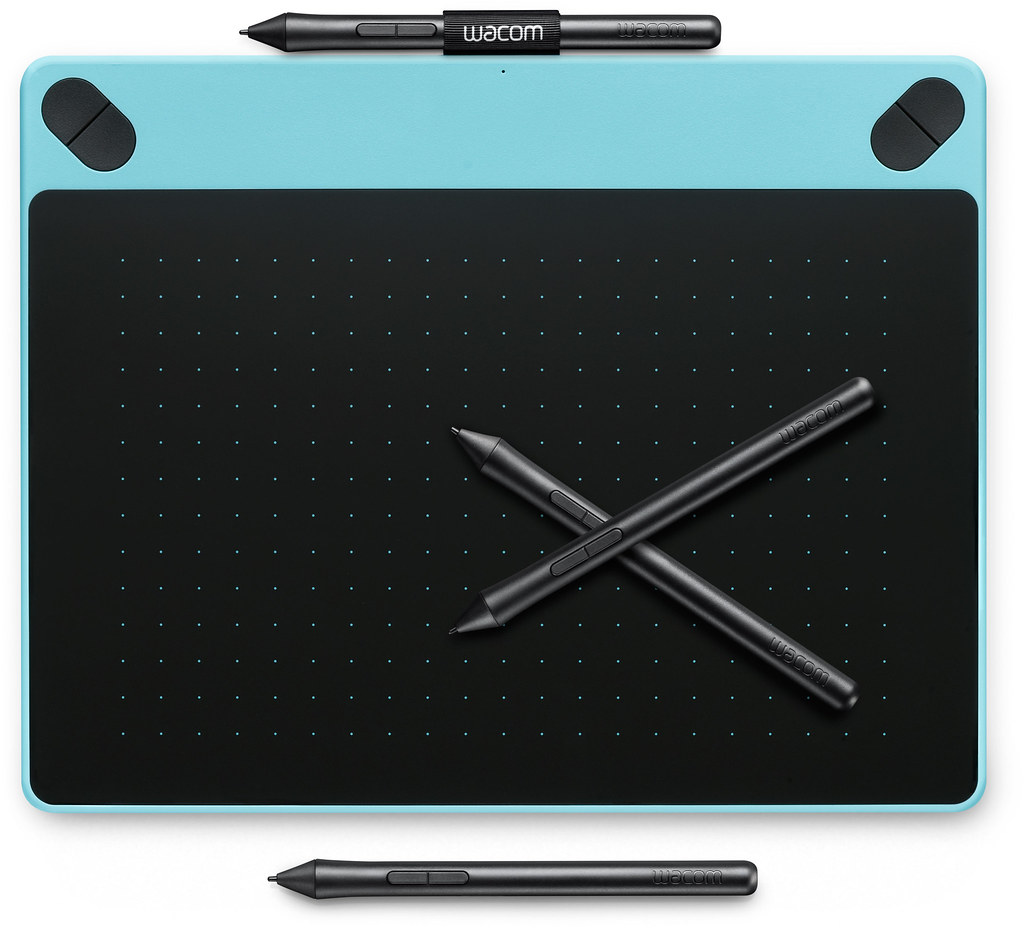
Paint and brushes aren't needed to create a piece of art. Your artistic talent can flow from your fingertips to the computer screen in digital form in seconds. You can create designs in pretty pastels, interesting inks, charming charcoals, neat natural lines, and tons of other techniques.
The pressure-sensitive pen mimics a paintbrush that adjusts the line thickness from fine tip to wide line depending on how hard you press against the tablet surface.
It comes preloaded with drawing software, and the company has thrown in lots of tutorials to help get you get started. On both upper corners, shortcut keys are within reach but not in your way as you draw.
Couple that with the multi-touch surface, and you can do everything you need to without reaching for a mouse or keyboard. Panning, zooming, and other common tasks can be done without your fingers leaving the tablet.
It's compatible with Mac 10.8.5 and later versions as well as Windows 7 and up. Plug in the included 4-foot USB cable to connect to your PC or laptop, and you're ready to go.
The Wacom Intuos Medium Art tablet is what I use and I find it ideal for on the go cartooning work. The Intuos tablet range in this series includes the Art tablet (best suited for cartoonists), Comic, Draw and Photo. Basically the same tablets but with differently included software.
Wacom Intuos Art tablet review
I believe that the ‘Art' tablet suits the cartoonist because of the included software that comes with it. Personally, I have been a huge fan of Photoshop in its many different versions for over 20 years. So the software which comes with each tablet didn't really matter in my case as I had it already installed.
For a newbie to digital drawing the Intuos range supplies a superb out of the box product that can have you up and drawing without having to faff about buying additional software.
In addition, the features are superb and the pen on tablet draws superbly well as you would expect with Wacom. The only criticism I have, which applies to all Wacom products is that they are overly expensive. I will explain this as I come on to my next tablet…
XP-Pen Deco 01 – Graphics Drawing Tablet without Graphics Software Included

The extra working space on this tablet is one of its most attractive features. With its 10×6.25-inch work surface, it's big yet practical.
Use the included drawing glove and comfy pressure-sensitive stylus pen to sketch, paint, draw, and design with plenty of room to use both hands.
Eight extra pen nibs are included, and the eight programmable pen buttons provide tons of artistic options. The pen doesn't require any batteries, so you can draw for hours without stopping for a charge.
The eight round express keys run vertically along the side, and the tablet can be flipped for left- or right-handed users. Change your brush style, undo the last action, erase, or save your work with a gentle touch to these buttons.
The work area has soft-light markings on each corner to indicate the working area. If natural light is lacking, the edges provide a perfect amount of illumination.
This tablet is on the lower end of the price scale but doesn't lack any prime artistic functionality. I have recently reviewed this tablet for XP-Pen.com and think it is really good value and is possibly the tablet to watch.
Unlike the Wacom Intuos range, it does not come with included graphics software. However, due to it's much lower price than the Intuos range this is not an issue as you can buy this tablet and software for less than the Intuos alternative.
For artists searching for the graphics drawing tablets on a budget, this is definitely one to consider.
xp-pen deco 01 review
I used the tablet constantly for over three weeks before writing the review. I have to say I was and still am very impressed with this great tablet. It looks good, it was really easy to set up and it draws beautifully.
In addition, it is around half the price of a medium Intuos Art tablet but doesn't come with graphics software. When you consider the price of Adobe Photoshop Elements software it still works out cheaper.
Apart from the excellent drawing experience I really appreciated the easy set up of this tablet and how simple it is to customize the eight express keys. This is a massive plus for me as setups in any gadget are usually horrendous. It is my pet hate.
I believe the XP-Pen Deco 01 will prove to be a real contender as an equally good rival to the Intuos range and will make a great started tablet or second more mobile tablet for the more experienced cartoonist.
XP-Pen Deco 01 official site : https://www.xp-pen.com/product/84.html
XP-Pen Deco 01 Amazon US : https://www.amazon.com/10x6-25-Graphics-Battery-free-shortcut-pressure/dp/B077P6BQP7
Wacom Intuos Art Medium Pen and Touch – Best buy Graphics drawing Tablets with Graphics Software Included
Paint and brushes aren't needed to create a piece of art. Your artistic talent can flow from your fingertips to the computer screen in digital form in seconds. You can create designs in pretty pastels, interesting inks, charming charcoals, neat natural lines, and tons of other techniques.
The pressure-sensitive pen mimics a paintbrush that adjusts the line thickness from fine tip to wide line depending on how hard you press against the tablet surface.
It comes preloaded with drawing software, and the company has thrown in lots of tutorials to help get you get started. On both upper corners, shortcut keys are within reach but not in your way as you draw.
Couple that with the multi-touch surface, and you can do everything you need to without reaching for a mouse or keyboard. Panning, zooming, and other common tasks can be done without your fingers leaving the tablet.
It's compatible with Mac 10.8.5 and later versions as well as Windows 7 and up. Plug in the included 4-foot USB cable to connect to your PC or laptop, and you're ready to go.
The Wacom Intuos Medium Art tablet is what I use and I find it ideal for on the go cartooning work. The Intuos tablet range in this series includes the Art tablet (best suited for cartoonists), Comic, Draw and Photo. Basically the same tablets but with differently included software.
Wacom Intuos Art tablet review
I believe that the ‘Art' tablet suits the cartoonist because of the included software that comes with it. Personally, I have been a huge fan of Photoshop in its many different versions for over 20 years. So the software which comes with each tablet didn't really matter in my case as I had it already installed.
For a newbie to digital drawing the Intuos range supplies a superb out of the box product that can have you up and drawing without having to faff about buying additional software.
In addition, the features are superb and the pen on tablet draws superbly well as you would expect with Wacom. The only criticism I have, which applies to all Wacom products is that they are overly expensive. I will explain this as I come on to my next tablet…
XP-Pen Deco 01 – Graphics Drawing Tablet without Graphics Software Included
The extra working space on this tablet is one of its most attractive features. With its 10×6.25-inch work surface, it's big yet practical.
Use the included drawing glove and comfy pressure-sensitive stylus pen to sketch, paint, draw, and design with plenty of room to use both hands.
Eight extra pen nibs are included, and the eight programmable pen buttons provide tons of artistic options. The pen doesn't require any batteries, so you can draw for hours without stopping for a charge.
The eight round express keys run vertically along the side, and the tablet can be flipped for left- or right-handed users. Change your brush style, undo the last action, erase, or save your work with a gentle touch to these buttons.
The work area has soft-light markings on each corner to indicate the working area. If natural light is lacking, the edges provide a perfect amount of illumination.
This tablet is on the lower end of the price scale but doesn't lack any prime artistic functionality. I have recently reviewed this tablet for XP-Pen.com and think it is really good value and is possibly the tablet to watch.
Unlike the Wacom Intuos range, it does not come with included graphics software. However, due to it's much lower price than the Intuos range this is not an issue as you can buy this tablet and software for less than the Intuos alternative.
For artists searching for the graphics drawing tablets on a budget, this is definitely one to consider.
xp-pen deco 01 review
I used the tablet constantly for over three weeks before writing the review. I have to say I was and still am very impressed with this great tablet. It looks good, it was really easy to set up and it draws beautifully.
In addition, it is around half the price of a medium Intuos Art tablet but doesn't come with graphics software. When you consider the price of Adobe Photoshop Elements software it still works out cheaper.
Apart from the excellent drawing experience I really appreciated the easy set up of this tablet and how simple it is to customize the eight express keys. This is a massive plus for me as setups in any gadget are usually horrendous. It is my pet hate.
I believe the XP-Pen Deco 01 will prove to be a real contender as an equally good rival to the Intuos range and will make a great started tablet or second more mobile tablet for the more experienced cartoonist.
XP-Pen Deco 01 official site : https://www.xp-pen.com/product/84.html
XP-Pen Deco 01 Amazon US : https://www.amazon.com/10x6-25-Graphics-Battery-free-shortcut-pressure/dp/B077P6BQP7
Comments
Post a Comment